How To Add Asset Properties
 Noah Parker
21 Jun 2026
Asset properties allow you to store extra information about your company assets. Instead of tracking only the asset name and type, you can add details such as serial numbers, brand names, warranty information, model numbers, and more.
Custom properties help keep asset records complete and make it easier to find important information when you need it.
Open Asset Settings
Log in to your Payrun account.
Click Settings from the left sidebar.
Select Assets.
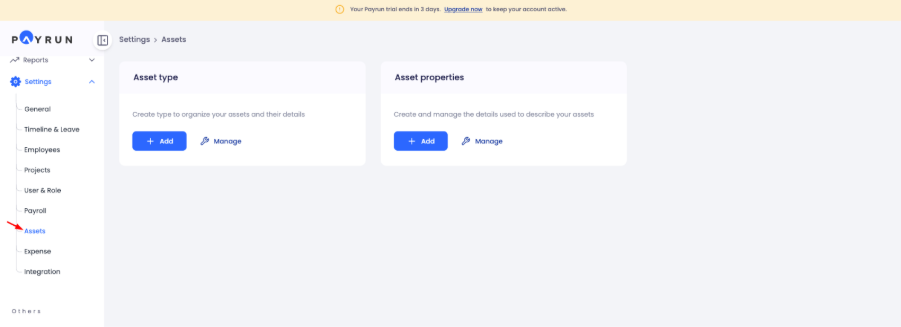
The Asset Settings page contains options for managing both asset types and asset properties.
Access Asset Properties
Under the Asset Properties section, you'll find tools for managing the fields used across your asset records.
Click Manage to view the existing properties in your workspace.

Here, you can see all available asset properties and how many asset types are currently using them.

Create A New Asset Property
To add a new property:
Return to the Asset Properties section.
Click Add.
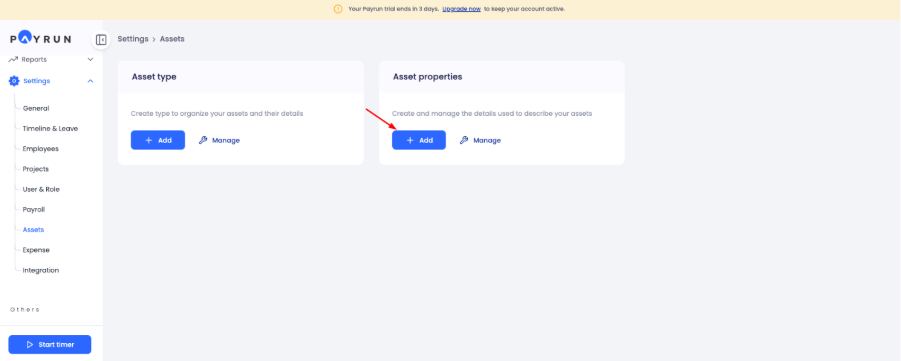
A small window will open where you can enter the property details.
Enter A Property Name
In the Property Name field, type the name of the information you want to collect for your assets.

For example:
Asset Tag
Model Number
Purchase Date
Warranty Expiry
Manufacturer
Storage Capacity
Choose a name that is clear and easy for your team to understand.
Save The Property
After entering the property name:
Review the value.
Click Add.
Payrun will instantly create the property and make it available for asset management.
Check The Property List
After saving, the new property will appear in the Asset Properties list.
You can now use it when creating asset types and managing asset records.
Why Add Asset Properties?
Every organization tracks different information about its equipment. Asset properties give you the flexibility to store the details that matter most to your business.
For example:
IT teams may track serial numbers, processors, and storage capacity.
Operations teams may track purchase dates and warranty periods.
Facilities teams may track asset tags and locations.
Keeping all this information in one place makes asset management much easier.
Conclusion
Asset properties help you build more detailed and organized asset records in Payrun. A few custom fields can make a big difference when tracking equipment, managing inventory, and maintaining accurate asset information across your organization.