How To Add An Asset In Payrun
 Noah Parker
18 Jun 2026
Payrun's Asset Management feature helps you keep track of company-owned equipment such as laptops, mobile phones, monitors, office furniture, and other workplace assets.
Adding assets to the system ensures you have a centralized record of company property, making it easier to assign, monitor, and manage assets across your organization.
Open The Assets Module
Log in to your Payrun account.
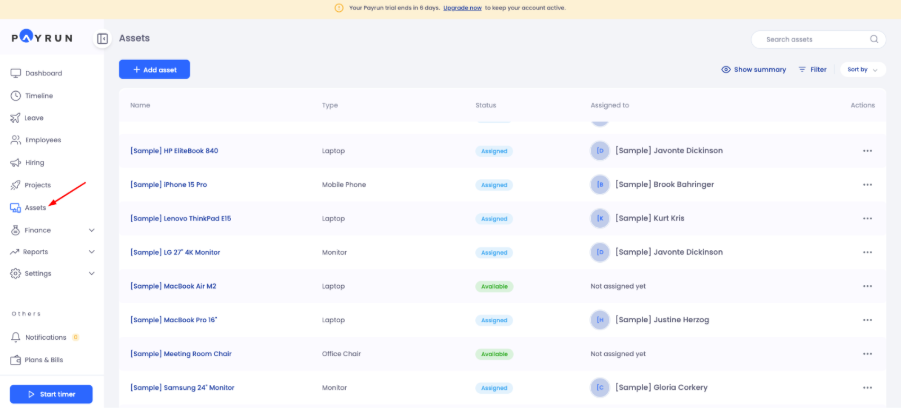
From the left navigation menu, click Assets.
The Assets page will display all existing company assets, along with their status and assignment details.
Start A New Asset Entry
On the Assets page:
Click the Add Asset button located at the top of the page.

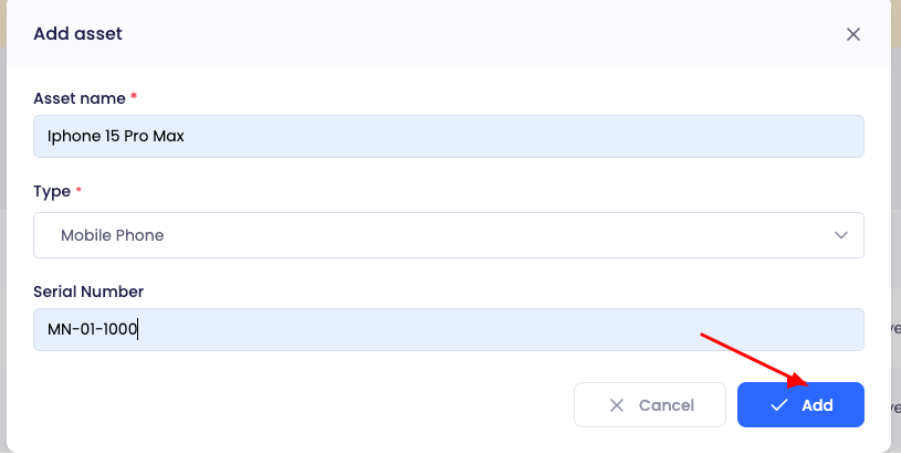
An Add Asset window will appear.

Enter Asset Information
In the Add Asset form, provide the required details:
Asset Name
Enter a clear and recognizable name for the asset.
Examples:
MacBook Pro M2
iPhone 15 Pro Max
Dell Monitor 27"
Office Chair
Asset Type
Select the appropriate asset category from the Type dropdown menu.
Examples may include:
Laptop
Mobile Phone
Monitor
Office Chair
Other asset categories available in your workspace
Serial Number
After typing the asset name and asset type, the box for Serial Number will appear enter the asset's serial number or unique identification code.
Adding serial numbers helps with asset tracking, audits, and inventory management.
Save The Asset
After completing the required information:
Review the entered details.
Click Add.
Payrun will create the new asset and add it to the asset inventory.
Verify Successful Creation
Once the asset is added successfully, a confirmation message will appear in the top-right corner of the screen.
The newly created asset will also become available in the asset list, where it can be assigned to employees or managed further.
What Happens Next?
After adding an asset, you can:
Assign it to an employee
Track asset availability
Monitor asset status
Maintain an up-to-date company asset inventory
Manage asset allocation across teams and departments
Conclusion
Adding assets in Payrun takes only a few moments and helps maintain accurate records of company equipment. A well-maintained asset inventory improves accountability, simplifies asset tracking, and ensures employees have the resources they need to perform their work effectively.